Wednesday, December 17, 2014

MINIMART: An After Effects Character Animation


"MiniMart"


It's 3 AM in the inner city. 
For sleepy old Greg Ormansen, this is his 9-5. 
For Markis Ricardo, this is chance to pay back his loan shark.

By Drew McCall


It's been a while since my last blog post because my E-Comm teachers (whom require that I turn in my assignments on this blog) have changed what they want in the posts as far as content goes. The posts will likely be way more "in depth" now and go "into the details" of the project, whatever that means.

Anyway, let's talk about white gangsters that drive astro vans.


The purpose of this project was to exercise our abilities using After Effects for 2D animation. We had to draw the characters, scan them, color them in photoshop, rig them in after effects, and animate them.
What's that?
Sounds easy, you say?
Obviously you've never used after effects before.

Like all films (good and bad), I started by outlining the story.
Most ideas for my work either come from exploring a concept that I find interesting (as is the case with Carl, a script I came up with after thinking about imaginary friends; the film itself is about an imaginary friend coming to terms with the fact that he doesn't exist), or out of necessity. In the writer's room it's important to accept ideas even if they aren't good, because they can sometimes lead you to a fantastic idea. I actually created this project several months ago when I didn't exercise this technique as much, but since I'm just now updating my blog post I thought I should include it.

If you don't mind, here's a quick tangent about storytelling:


 itcame up with the idea after thinking about making a movie about a robbery. After considering options for the story, I decided to make it about mistaken identity, where the robber is mistaken for a person applying for a job. I was unsure how  to tell the story without them talking, but after some research, I found a program that was capable of animating mouth movements called papagayo. I used it to animate the mouths only, everything else was made in after effects. I recorded my brother's voice for the character's voices and edited in iMovie. It took a very long time to make, hence the reason why I am late on posting this.


Next time, I would definitely take the time to draw out all of the backgrounds, because I used pictures off of the internet for the backgrounds inside of the minimart. I did, however, like using the software to animate the mouths. If I ever need to quickly animate mouths, I will definitely use that software again. I really liked this project and am happy with the final product. Plus, I think it's pretty funny, too.

Tuesday, December 2, 2014

Maya: 3-D (MC) Hammer Model


Hammer


By Drew McCall


These are hammers.


Why Hammers, you may ask?

Well, as it turns out, hammers can be very difficult when modeling in maya. Modeling hammers actually helps a lot when you are learning to model in a 3D modeling software.

The point of the project was to learn about making an object look realistic by altering the shape of polygon primitives. In order to make these hammers we had to form polygon primitives and shape the vertices and faces to make the shape of the tongs, then the hammer head, then the handle. Next, we had to color and texture the hammer, then finally, we had to light the scene with a 3-point lighting rig. After we were all finished modeling the scene, we had to render out several different views of it.

If I were to do this again I would probably put more time into setting up the lights, because the key light is a little too bright and casts too dark of a shadow. I think that my hammer is realistic, though, and that's the important part.


"I Want You Back" J-5 Music Video Post


JACKSON 5 MUSIC VIDEO BLOG


By Drew McCall


Keeping with the theme of the new blogpost requirements, I am reposting the last video project I posted and I will go far more in-depth about the inception of the project and how we carried it out. 
So here goes.

The purpose of the project was to create a music video using the 6-shot sequence, and we could choose any song we liked and tell any story we thought fit. My group spent some time trying to figure out what song we should do, but eventually settled on the Jackson 5's "I Want You Back" (partly because we liked the music but also because the song itself already gave us a hint as to the story we should tell). So based on the lyrics, we began to formulate an idea of this high-school student that had some history with this girl that he loved madly, but try as he may, cannot win her heart back. That is until she reads his love letter to her that proves he really does have feelings for her. In the end, they become a happy couple again.

This was not a very difficult project in pre-production compared to post-production. While filming was a fairly long but easy process, we ended up filming too much video to include it all in the video the way we would have liked to. The part in the video where our protagonist tries to buy his girl's love was far to long. For my longer version, I tried to keep all of the shots in the video by adding transitions to make the shots fit the length of the song. While this technique worked, it made it look a little too weird and confusing. After showing it to a peer, she said the transitions made sense, but gave her a headache when she watched it. For my second, shorter video, however, I cut all of the extra shots completely, leaving only a scene where he tries to give her a rose which she throws away. I think this was good, but I still would have liked to have included all of the original shots. 

In all, I liked this project but I definitely will remember to go lighter when I'm shooting the footage and only film the necessary shots. I will also be sure to make sure that I will be able to tell the entire story that I want to tell with the given time constraints of the song. This project was an exercise in editing creativity, and I think I passed... But just barely!

Friday, October 31, 2014

"I Want You Back" Music Video REDUX


Music Video 

REDUX


By Drew McCall


This is the shortened version of the original music video that I made. I liked the other longer video better because it included most of our shots, and it makes a little more sense than this one! In the last version I tried to make the video line up with the music, so several of the scenes were shortened already. With this one I decided to cut all of the scenes except for the rose scene so that it lined up with the music better. I definitely prefer the longer version, but I think that I did a fairly good job getting the basic idea of the story in here.

Wednesday, October 22, 2014

"I Want You Back" Music Video


"I Want You Back" Music Video


By Drew McCall


For my group's music video we chose the song "I Want You Back" by the Jackson 5. Our idea for the video came from the lyrics, where a teenage highschooler loses his girlfriend and 'wants her back'. He tries buying presents to win her over, but in the end it's his heartfelt letter to his ex that proves his true love for her.


I learned a lot about how to make a music video from this project. For instance, when you're making a music video, it's very important to make sure that all of your shots will be able to fit given the time constraints of the song. You may have a fantastic video planned, but if your video is longer than the song, then your video will not look good. The same goes for a video that is too short. I had to shorten a lot of the shots because we simply didn't have enough time to fit all of them in at their original runtime. Second, a music video can be enhanced by making the shots line up with the music in the music video. This is true for the music in any video, it really gives the video a professional touch. Lastly, it is important to make sure that you always check white balance in all of the shots. I had to color correct a few shots that were shot in the same location but at different times; some of the shots looked great, but other shots looked slightly tinted with red. It was a pain to go back through and have to change all of the bad shots to match the good shots, and in the end it all could have been prevented if we remembered to use white balance! I really enjoyed this project and I am happy with the final result.

Thursday, October 9, 2014

The Plausible Impossible: Animation Theory


THE PLAUSIBLE IMPOSSIBLE


By Drew McCall


In this project, we had to choose 5 moments from one of the supplied cartoons and list a series of "plausible impossibles". Plausible Impossibles are instances where something is impossible under the circumstances, but is made to appear possible to the audience. Below are some examples from a Disney "Gus Goose" cartoon.


EXHIBIT 'A': CHAIR MOTION

In the cartoon, Gus Goose arrives at Donald Duck's house and rushes in after smelling the delicious spread of food that Donald has prepared to eat. He rushes in so fast, that the chair rocks back and forth extremely quickly (like a spring) before it stops. This is a plausible impossible because it is plausible to rock back and forth in a chair like he did, however it is impossible for the chair to rock back and forth like this simply by running into it fast. The chair also does not behave like a spring, such as the cartoon suggests.


EXHIBIT 'B': SANDWICH CARDS

After sitting down, Gus goose then begins to eat. He takes two tall stacks of bread and bologna and begins to 'shuffle' them in order to make a sandwich. It is plausible to "shuffle" the bread and bologna if you TRY, but they will by no means behave like a deck of cards, and shuffling them would not make a sound similar to a deck of cards shuffling. This is therefore a plausible impossible.


EXHIBIT 'C': ACCORDION NECK

Gus Goose then takes the sandwich that he just created and eats it. This causes his neck to elongate upward, and causes his neck to take the shape of an accordion, and even make the sound of an accordion. This may seem plausible because the sandwich is so very large that it may seem as though his neck will take the shape of it once the sandwich is inside, but this is impossible because his neck is unable to get longer or change shape in real life. His neck also cannot make the sound of an accordion simply because he ate a sandwich. Once again, this is considered a plausible impossible.


EXHIBIT 'D': PASTA SOCK

After seeing a heaping plate of spaghetti, Gus Goose then takes out a pair of knitting needles and gets to work knitting the noodles into a sock, which he then slurps down as though the entire sock was made out of one enormous noodle. While it may be plausible to create a single long spaghetti noodle and make pasta out of it, it is preposterous to think that he would be able to knit the noodle into a sock and then slurp it down the way Gus Goose did. This is yet another example of a plausible impossible.


EXHIBIT 'E': COFFEE AND BREAD

After getting irritated with Gus Goose eating all of his food, Donald Duck tries to calm his nerves by pouring himself a cup of coffee, with which Gus Goose promptly sticks a baguette into. The baguette then appears to soak up ALL of Donald's in a matter of a few seconds. It is definitely possible to have bread soak up a drink like coffee, plenty of people do this every day. But it is impossible to have a piece of bread soak up ALL of the coffee in a coffee mug and still retain its shape. It is also impossible to think that the bread would be able to soak all of it up in just a few short seconds. This makes this instance another plausible impossible.


These are just a few examples of plausible impossibles that I saw during the first minutes of this cartoon. Plausible impossibles are things that many audiences take for granted in cartoons, they are part of what makes cartoons so enjoyable. Plausible impossibles are everywhere in the cartoon world, and being aware of them is a necessary part of being a successful animator.


Thursday, September 25, 2014

REAL LIFE SASQUATCH SIGHTING! (Or, 'After Effects Multiplane Animation')


RETURN OF THE 'SQUATCH


Multiplane Animation

By Drew McCall


This is a completely legitimate Sasquatch sighting.


In this project, we chose a location in which we would create a 3D effect in a 2D animation. The idea behind it is that the farther away an object is from the viewer, the slower it appears to move as the viewer moves, while the things closest to the viewer move faster. Using the multilane (or rather, multilayer) technique in photoshop, we created this effect by animating the closest layers faster than the farthest layers. In this project I learned that this technique can make an otherwise mediocre animation look professional. It actually wasn't very difficult to do, in my opinion. All you really had to do was keep track of which layers are closest and which are farther away. I really enjoyed this project because very cool effects can be created by using this very simple technique.

Tuesday, September 23, 2014

"The Chase": REDUX


THE CHASE REDUX

By Drew McCall


This project seems somewhat familiar...


This project utilized the sequencing that we learned with our past two projects.
I learned a lot about the teamwork behind making videos, because we really had to work together and everyone had to be involved in what was going on. I liked how we got to use music, because the music really helped to create the mood of the video. Intense music can really make a video scary. I also learned how to use color correction to get the right look for the video. In all I really enjoyed this project.


Monday, September 15, 2014

Capt.' Ironside: A Voyage Across the Seven Seas of Character Design


The Ballad of Captain Ironside


(Or, Character Animation 101)


By Drew McCall


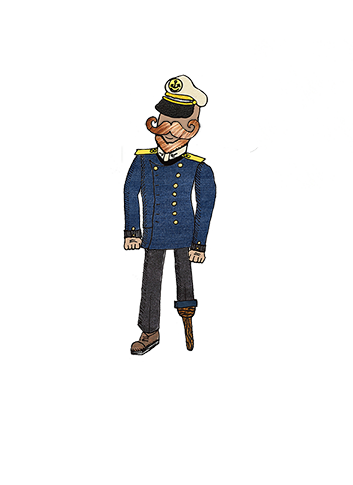
This is Captain J. Mortimer Ironside...


This character is one that I drew on paper, scanned into photoshop, and animated in After Effects. This was a very time consuming process, which took a lot of patience while both animating and editing the original drawing. The original drawing, by the way, looked like this:


I chose this sea captain mainly because I liked the idea of having sea captain named 'Ol' Ironside'.


After assigning layers to each of the body parts and adding some texture and color to it, it ended up looking like the character you see above. I wasn't done yet, though. I still had to animate it.
It took a while to create the background ship and sea, and I had to use the perspective tool to get the floor to look right. In the end I was very happy with the way it looked. I animated the legs and added a slight movement to the body to make the walk cycle seem a little more natural. I added a built in rain effect and... Presto! I was done. I liked this project, it took a lot of time and patience but the end result was really worth it.


Tuesday, September 9, 2014

"Overdue: Librarians at Work" - Experiments with the 6 Shot Sequence


'OVERDUE'

By Drew McCall


This video utilizes the 6-shot sequence that we learned about during the previous project, only this time, we had to use 2 sets of the 6 shot sequence.

The 6-Shots I'm talking about are:

ECU - Extreme Close Up
CU - Close up
MS - Medium Shot
WS - Wide Shot
EWS - Extreme Wide Shot
OTS - Over the Shoulder

I liked this project because we were allowed to make longer videos and I learned that Brendan does a great boring teacher impersonation. Some of the things that I learned are that white balance helps to keep sots consistent, and that planning and storyboarding is essential to making a good movie.

Friday, September 5, 2014

2D Inchworm: Early After Effects Project


2D INCHWORM


By D. McCall


THIS IS A WORM.

Yeah, this isn't a very good project. It was fun to do, and I learned a lot, but you really should just move onto the other projects I have.

Thursday, September 4, 2014

3D Inchworm: EXTREMELY Basic Character Rigging in After Effects


3D INCHWORM TUTORIAL


By D. McCall


THIS IS A WORM.

After being instructed to by one Mr. Netterville, I completed the 3D Affter Effects inchworm tutorial posted on YouTube by a certain Australian animator whose name I am not familiar with. Nevertheless, the fruits of my hours and hours of hard labor are now posted for the world to see. Using the Puppet Pin tool, I was able to alter and shape the 3D inchworm to move just like an actual worm. I am happy with this final product.

Thursday, August 28, 2014

6 Shot Sequence; Or Evidence Why Audio Saves A Boring Movie


6 Shot Project


By Drew McCall


XCU: Extreme Close Up
CU: Close Up
MS: Medium Shot
WS: Wide Shot
EWS: Extreme Wide Shot
OTS: Over The Shoulder

This project was over David's Hobby, which is soccer. I liked this project because we got to use a wide variety of shots and I got to learn how to use the fancier cameras and editing software. My favorite shot is the extreme wide shot because you are able to show a lot about the setting of the video. In all I think this was a good project. I should note, however, that we were rushing to get the shots in so some of them are a little short and choppy.

Wednesday, August 27, 2014

Beginning of Sophomore Animation: Bouncing Balls Is Harder Than You Think

BOUNCE!


By D. McCall


This Project is a bouncing ball.


As simple as it may sound, it is actually a very time consuming and labor intensive project for such a 

simple product. At first, I started with the lower video, created in photoshop. It's pretty plain, without 

any squash or stretch attributes. Photoshop is NOT an ideal platform for making animations of any 

kind, so an animation like this is as expected. The animation on top, however, was created in Adobe 

After Effects, which is the perfect program for making animations like this. So, with an added squash 

and stretch, paired with a bounce of the edge of the screen, it looks FAR better. In all, I enjoyed this 

project and am happy with the final product.